Book an Appointment
Call Sunrise Computer Repair Service at 754-241-1655
                   

(754) 241-1655

*


Sunrise Computer Repair Service has provided the best mobile computer repair in Sunrise, FL and the greater Miami Metropolitan Area since 1999. The term "mobile computer repair" means we come to you to resolve all your computer problems.

We repair laptops, desktops, PCs and Apple computers. One of our highly qualified staff will come to you, often the same day, to take care of all your repair needs.

Why not use the #1 rated company for computer repair in Sunrise, FL?

Computer Repair 4.9 / 5 stars from 324 reviews
Why use a computer tech when you can have a Sunrise based Computer Engineer? Mon-Sun 8:00am - 8:00pm

Call us at (754) 241-1655

Text us at (754) 241-1655

Email us your questions

Book an Appointment

"Great service and friendly staff. Got my computer fixed same day, thank you!"
Sunrise Computer Repair Service 5 / 5 stars
"Dustin, the technician, did an awesome job. He kept me informed along the job. Techs like Dustin, make me a customer for life. "
Sunrise Computer Repair Service 5 / 5 stars
"Wonderful service, from the initial phone call and scheduling, very upfront on costs. The tech showed up on time, with a 15 min courtesy call, he was professional, knowledgeable and gave great advice. He replaced my hard drive and got me back up and running. I would recommend this service. I chose it because of all the positive online reviews and I was not disappointed."
Sunrise Computer Repair Service 5 / 5 stars
"Josh was again superb. He reinstalled my HP printer software and now I can scan once again. Much thanks for your service."
Sunrise Computer Repair Service 5 / 5 stars
"Fast service! Fixed all of my computer problems and was very helpful in making suggestions on products I needed. He arrived on time and was professional. Overall a very pleasant experience and I will call again!"
Sunrise Computer Repair Service 5 / 5 stars

Who is Sunrise Computer Repair Service?

Sunrise Computer Repair Service is owned by Matt Karls, an Electrical Engineer and a Computer Systems Engineer. We are a team of computer professionals focused on Service and quality, all our work is guaranteed.

If you have any computer, technology or IT problem in Sunrise, FL we can fix it. We have been performing computer repair in Sunrise full time since 1999. Feel free to give us a call or text us at (754) 241-1655.

Sunrise Computer Repair Service's Computer Engineer

What is your Service Area for on-site Computer Repair?

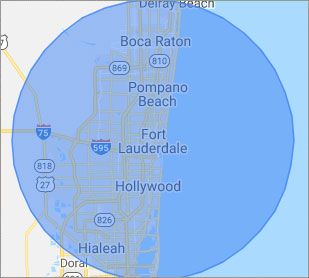
Our primary on-site mobile service areas include the greater Miami Metropolitan Area as well as the Tampa, Orlando and Jacksonville metro areas.

We provide remote and mobile computer repair in Sunrise, Fort Lauderdale, Hialeah, Hollywood, Pembroke Pines, Miami, Miramar, Coral Springs, Miami Gardens, Pompano Beach, West Palm Beach, Davie, Boca Raton, Plantation, Miami Beach, Deerfield Beach, Boynton Beach, Weston and Coral Gables.

Our on-site Computer Service Area

What should someone expect that hires you for Computer Service?

Our mission is to fully resolve your computer problems quickly and affordably. If you want a Computer Engineer that can fix all of your computer problems instead of a computer tech, a computer geek, a technician or a computer guy that can only fix some of your problems; call us at (754) 241-1655.  

What types of Computer Services do you perform?

We service businesses and business clients in their homes, including:
 
  • Diagnose / repair hardware or software problems
  • Spyware, malware, trojan and virus removal
  • Setup wireless and small business networks
  • Laptop repair, PC repair and Apple repair
  • Hard drive data recovery

Sunrise Computer Repair Service Contact Information

Sunrise Computer Repair Service
Sunrise, FL 33351
(754) 241-1655

Sunrise Computer Repair Service is a Karls Technology company

* *
*
*
*
  *
* *


*
*
* * * * * * * * * * * * * * *
4.9 / 5 stars from 324 reviews

"Great service and easy to work with!!!"

Sunrise Computer Repair Service 5 / 5 stars

"Anthony was very helpful in each step of the process, very professional."

Sunrise Computer Repair Service 5 / 5 stars

"My tech was great and appeared knowledgeable, I won't hesitate to contact again and I would highly recommend."

Sunrise Computer Repair Service 5 / 5 stars

"Taylor worked through 6 PC systems with great ease. Very satisfied with his skills and his help servicing our systems."

Sunrise Computer Repair Service 5 / 5 stars
Best Antivirus Software of 2026: The Ultimate Guide to Cybersecurity Brands

In 2026, the digital threat landscape has shifted. We are no longer just fighting simple viruses; we are defending against AI-generated phishing, sophisticated ransomware-as-a-service, and complex identity theft. Choosing the right antivirus brand is no longer optional—it is the foundation of your digital life. At Karls Technology, we’ve analyzed the top-performing security suites of the […] The post Best Antivirus Software of 2026: The Ultimate Guide to Cybersecurity Brands appeared first on Computer Repair Blog.

Low Power Mode on macOS

What exactly does the low power mode on macOS accomplish? When you put your device into low power mode, it adjusts its settings to cut back on power consumption as much as possible. In order to save energy, the display’s brightness and the computer’s clock speed will drop automatically. On addition to conserving power, turning […] The post Low Power Mode on macOS appeared first on Computer Repair Blog.

What are Snap Layouts?

Microsoft users, read on! According to Microsoft, snap layouts are a new Windows 11 feature to help introduce users to the power of window snapping. Snap layouts are easily accessible by hovering the mouse over a window’s maximize button or pressing Win + Z. These snap layouts provide you a lot of leeway in terms […] The post What are Snap Layouts? appeared first on Computer Repair Blog.

Windows OS Hibernation

A feature of the Windows operating system that can be found in both desktop computers and laptops is called hibernation. It is possible to program it to take place automatically if a battery alert goes out. Its primary function, with regard to desktop computers, is to act as an all-around method for conserving energy. Because […] The post Windows OS Hibernation appeared first on Computer Repair Blog.

Update Routers to Prevent Bricking

Routers need firmware, like computers and phones. Like other devices, your router’s firmware must be updated. Many firmware updates are security remedies for router vulnerabilities. Hackers could take over your network through these weaknesses. You must periodically visit the “Support” area of your router’s manufacturer’s website for firmware updates. New updates should be implemented as […] The post Update Routers to Prevent Bricking appeared first on Computer Repair Blog.

Change Windows Update Times

You can alter the the times your computer is available to update. And it’s easy to do so. Schedule Windows Update to begin and end at certain times. The configuration tool may be launched by searching the Windows Update settings. The parameters may be updated to alter the active times. Select new working hours here. […] The post Change Windows Update Times appeared first on Computer Repair Blog.

New Microsoft Defender SmartScreen Feature

In an effort to ward off phishing attacks and encourage users to use strong passwords, Microsoft released Defender SmartScreen. The Windows 11 22H2 update, which Microsoft issued at the end of the previous month, included a new feature that should make it easier for users to keep their credentials secure. When logging into an app […] The post New Microsoft Defender SmartScreen Feature appeared first on Computer Repair Blog.

Webcams Can Be Hacked

The webcam can be compromised if an unauthorised program, application, or device is used that contains a vulnerability that hackers can exploit. Malware can inadvertently be acquired by users when they interact with phishing links, download malicious attachments, or visit compromised websites. This software could be used by an intruder to secretly record from a […] The post Webcams Can Be Hacked appeared first on Computer Repair Blog.

New Processor Compatibilities on Windows 11

The rigorous system requirements of Windows 11 and Microsoft’s insistence on using only the most recent hardware earned widespread criticism even before the operating system was made available to the public. According to Windows Latest, many PCs will not be able to acquire an official transition to Windows 11 from previous Windows operating systems. Windows […] The post New Processor Compatibilities on Windows 11 appeared first on Computer Repair Blog.

Hide Taskbar Temporarily on Windows 10

Using Windows’s taskbar settings, you can temporarily hide the bar if you just need to do so. To customize your taskbar, right-click anywhere on it and choose “Taskbar Settings.”Move the slider under Desktop mode to enable the option to automatically conceal the taskbar. The desktop mode option enables full-screen mode when used. Simply move your […] The post Hide Taskbar Temporarily on Windows 10 appeared first on Computer Repair Blog.